

CRM stands for customer relationship management, and is widely known as CRM in the industry. A CRM is a software system that helps businesses capture leads from their ads, manage customer information, track communication history, and organise sales activity throughout the entire buying process, ensuring every customer inquiry receives a follow-up.
CRM is an essential tool for a sales and marketing team from Enterprises and SMEs handling a high volume of leads on a day-to-day basis, multiple salespeople, or any form of high-touch sales cycle, giving better structure, sales visibility, and accountability.
Types of Customer Relationship Management solutions
Cloud-based CRM
A cloud CRM is hosted online and accessed through a web browser or mobile app. The vendor manages the servers, updates, and security. You simply log in and use it.
Cloud CRM is usually preferred by modern SMEs because:
- you don’t manage servers or hardware
- setup is fast
- you pay monthly or yearly
- updates happen automatically
- your team can access it from anywhere
It’s the standard model for growing businesses, especially those handling online leads or distributed teams.
Examples: Leaf CRM, Salesforce, HubSpot, Zoho CRM
On-premise (self-hosted) CRM
On-premise CRM is installed on your own company servers. You control the system, infrastructure, and upgrades.
Companies choose on-premise when:
- need strict data control requirements
- require deep internal customisations
- want full control over infrastructure
This model is more common in large enterprises or regulated environments (banks, telcos, government agencies) because it comes with more responsibility:
- you need an internal IT team
- you manage backups, uptime, and security
- updates are manual
- hardware costs are upfront
It offers maximum control but also maximum maintenance.
How do different markets use CRM solutions in real life?
Malaysian businesses commonly use CRM for real-time lead operations. They capture enquiries from Facebook and TikTok ads, website forms, events, and WhatsApp messages, then distribute them to the right salesperson.
However, the CRM tool adoption rate often happens only after lead volume becomes difficult to manage manually.
Global research shows that North America still accounts for the largest share of CRM software spending and has the highest adoption rate. CRM is a standard part of the sales tech stack, rather than an optional upgrade. It is used for performance forecasting, multi-step pipelines, and role-based handoff between sales teams.
The CRM market in Southeast Asia is smaller but growing quickly as businesses are starting to digitise and move away from manual tools. Even the Malaysian government has introduced the Digital Economy Blueprint in 2023 to encourage businesses to adopt technology solutions, including CRM systems, by investing in digital infrastructure and offering incentives that make adoption more accessible.
What is a CRM system main function?
At a functional level, CRM systems can:
- Centralise customer and lead data
- Record communication history
- Manage sales pipelines and deal stages
- Create reminders and automate repetitive tasks
- Support teamwork between multiple salespeople
- Provide reporting and performance insights
The benefits of using a CRM system in a business operation
Reduce lost enquiries
A CRM captures and centralises all leads and customer data, including contact details, opportunities, and communication history.
Instead of relying on spreadsheets or emails, every team member works from the same source of truth. This prevents duplicate lead assignment, missed follow-ups, and confusion about who spoke to which prospect.
Track every interaction
CRM system is built to record every call, message, email, note, and meeting in one timeline. Salespeople can see exactly what was said, when they last followed up, and what needs to happen next. They don’t have to search through chat logs or rely on memory, as every past interaction is available when they reach out again.
On the other hand, business owners and managers can see whether a salesperson has actually followed up, how leads are being handled, and which prospects are stuck. With complete interaction history, you can segment customers for future campaigns, identify high-value opportunities, and prevent leads from being ignored.
Automate routine tasks
A CRM eliminates repetitive and manual tasks that slow down the teams. Information from lead forms, ads, and enquiries is captured automatically, follow-up reminders are created in the background, and deal stages update as reps progress through the pipeline. Instead of manually filling out spreadsheets to assign leads, CRMs can automatically assign them to the right salesperson.
Automation also gives the sales team operational clarity. A salesperson no longer needs to keep a separate list or scroll through chat histories to remember who to follow up. At low volumes, a salesperson might be able to manage leads manually. But when your business starts running ads or handling 50, 100, or 200 enquiries a day, a CRM becomes extremely important to organise and track everything. This makes priorities obvious and reduces stress, especially on busy days.
Shift resources to strategic roles
With CRM software automating repetitive operational tasks — such as capturing and distributing leads and tracking follow-ups — businesses can now invest in roles that drive growth, such as data analysts who uncover trends and strategists who enhance campaign effectiveness.
Marketing teams no longer need to spend their time exporting leads and can focus on interpretation, experimentation, and decision-making.
Assign leads immediately
Each new lead that enters the CRM system can instantly be routed to a specific person based on predefined rules, such as round-robin, product or service knowledge, performance, geographical location, etc.
This eliminates confusion over ownership, prevents multiple reps from messaging the same prospect, and makes follow-ups a personal responsibility. Salespeople know exactly which leads belong to them, and managers can see who is responding and who is not.
For example, if your business receives 60 leads in a day from Facebook ads, the CRM can assign them evenly across five sales reps. Each rep receives their own queue of leads, follow-up reminders are triggered automatically, and managers don’t need to manually sort spreadsheets or forward messages. Instead of arguing “who took this lead?” — the system answers it for you.
Improve consistency in customer experience and retention
A CRM helps your team respond consistently and professionally. Every customer interaction is recorded in one timeline: the past enquiries, meeting notes, proposals sent, and promises made.
Even if the prospect is transferred to a new salesperson, they can easily pick up the conversation to see what happened before, what was agreed, and what needs to happen next. This continuity builds trust. Customers would feel that the business understands them, not just treats them as a fresh enquiry each time.
Imagine a customer who reached out about a property unit last month. When they message again, the salesperson doesn’t need to ask, “Hi, who’s this?” The CRM shows the exact unit they asked about, the pricing discussed, the questions they had, and where negotiations stopped.
Sales reps can continue conversations immediately, and this kind of consistent experience makes the customers more likely to buy, return, or refer your business to others.
Increases cross-department coordination
CRM system connects sales, marketing, and support around a single source of customer truth — eliminating silos, reducing duplicated work, and ensuring consistent communication no matter who handles the customer.
With every lead origin, campaign detail, sales interaction, and report dashboard in one place, the entire organisation shares context and understands customer history. This unified view means marketing can track which channels really deliver, sales can follow up without asking redundant questions, and management and analysts can view reports and make informed decisions for strategy and budget.
The result: better internal alignment, faster decisions, and a trustworthy customer experience.
Make better forecasting and data-driven decisions
Managers and business owners can track how many leads came in, who responded, response speed, conversion rates, and where deals are getting stuck in the pipeline.
With structured data, analysts and decision makers can forecast revenue, identify which channels are profitable, see which reps are performing, and adjust strategy before problems grow.
For example, if a business receives 120 leads in a week and closes only 10, the CRM can show that:
- 50% of leads never received a follow-up
- 30% of leads waited more than 24 hours for a reply
- The highest sales closed came from TikTok ads, not Facebook
- One sales rep handled 40 enquiries but replied to only 15
Based on this, business owners don’t “feel” like something is wrong — they know:
- Who needs coaching
- Which channel deserves more budget
- Where the pipeline is leaking
- What to fix next
Grows with your business
CRM will always be a tool that gives a structure that works, whether you are a single salesperson managing enquiries or a team of fifty handling hundreds of leads daily. The processes you build inside CRM—lead capture, assignment, follow-ups, and reporting—stay consistent as your team grows.
New sales reps plug into the system instead of inventing their own workflow, which prevents chaos and protects the customer experience as volume increases.
Over time, some organisations develop very specific workflows, approvals, or internal rules that off-the-shelf tools can’t easily support. At that stage, CRM becomes the foundation: you can customise it, integrate additional tools, or even develop a system that matches how your business operates.
CRM is the pinnacle for making growth possible.
How does a CRM system work?
CRM captures leads from multiple channels
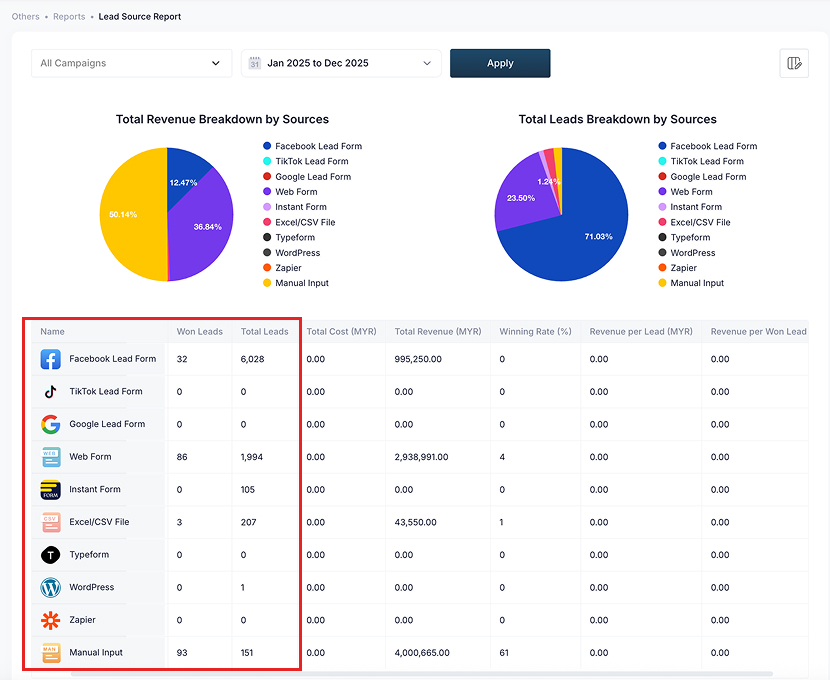
A CRM can capture enquiries from many sources, such as paid ads, website forms, email, social DMs, events, or call-ins.
So, instead of having someone to manually download or copy lead data into spreadsheets, a CRM can be used to capture all the enquiries automatically and create a record for it in the Master Data.
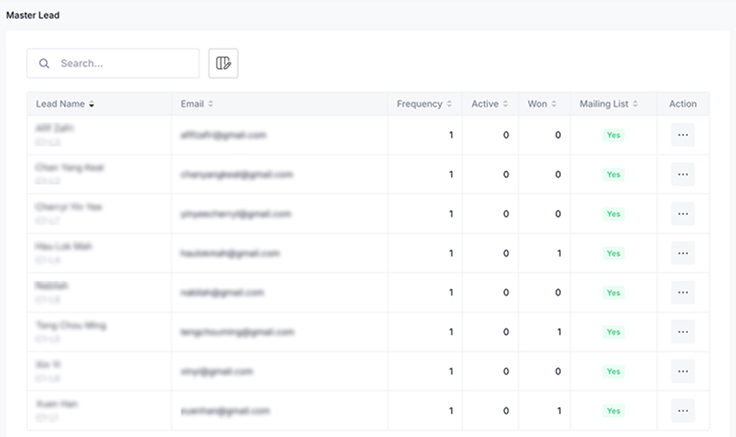
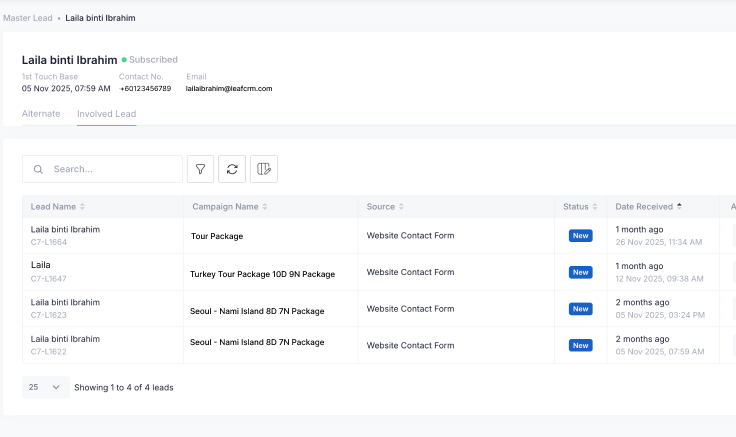
With a CRM, every single lead’s details and contact info will automatically be stored in the database for remarketing purposes while being assigned to the right salesperson in real time.
Leads are assigned to the right salesperson
Every lead’s details and contact info that is captured will automatically be assigned to the right salesperson, depending on your settings:
Round-robin distribution
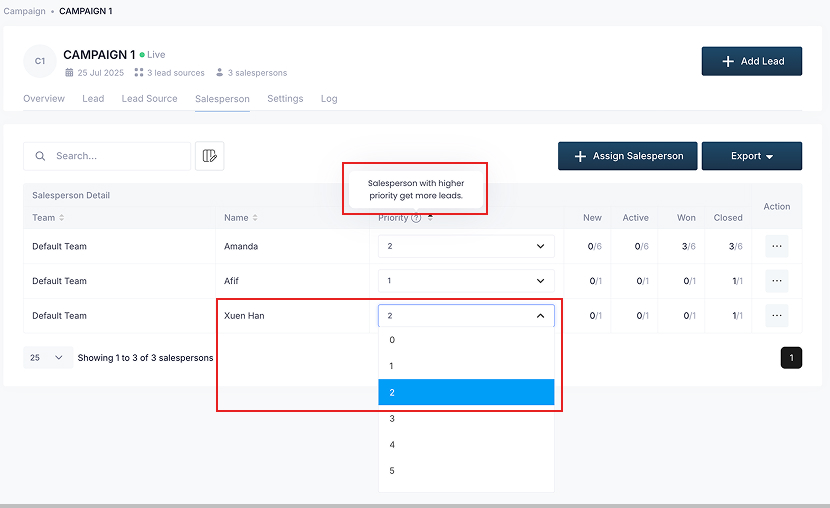
Round-robin distribution assigns new leads evenly across your sales team. Each salesperson receives leads in turn, based on priority or capacity, so no single person is overloaded, and no enquiry is left unattended.
This method is commonly used when:
- leads are similar in value and urgency
- team handles the same products or services
- workload needs to stay balanced
management wants visibility into how different salespeople perform with the same lead mix
Why team uses round-robin distribution?
- keep workload balanced so no enquiries are ignored
- reward high-performing salesperson by giving more leads
- measure sales team performance on an equal playing field
Rule-based lead routing logic
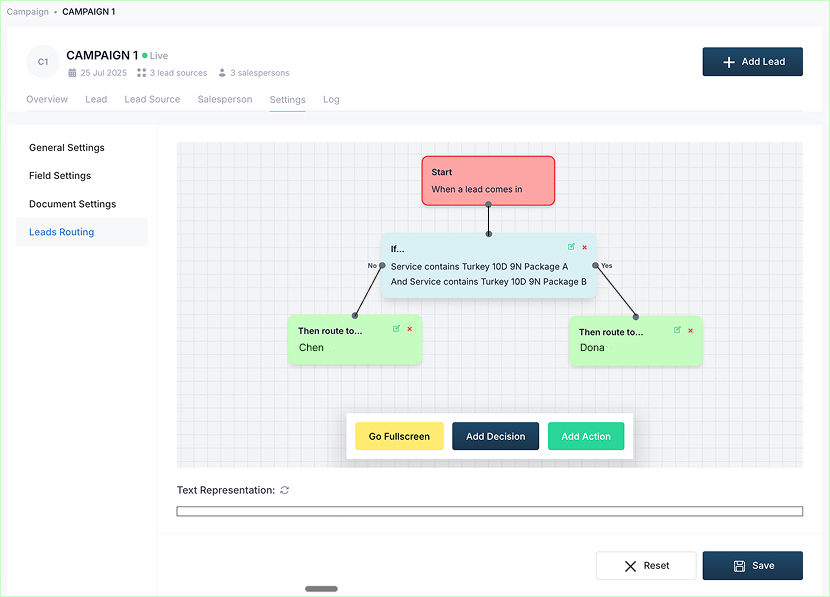
Lead routing assigns enquiries based on specific conditions, rather than rotation. The CRM evaluates each lead’s details before routing it to the most suitable salesperson.
This approach is used when:
- different salesperson handle different products
- territories or regions matter
- expertise or language is required
Common routing rules include:
- Geographical location
- Product or service category
- Knowledge and expertise
Whether using round-robin or rule-based routing, the outcome is the same. Every lead will get a clear owner and salesperson can immediately follow-up.
Saves activity log and notes for each lead
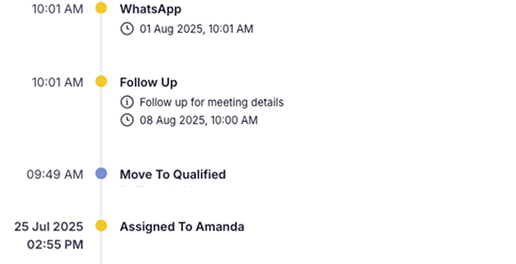
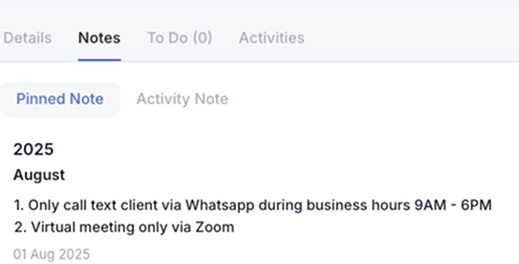
Activity logs and notes give a preserved context for the salesperson as a single source of truth, especially on:
- What the customer asked
- How the salesperson responded
- Proposals or pricing shared
- Agreement and requests
- Next steps agreed
- Date of the last touch
This helps the salesperson decide whether to move the opportunity forward, follow up again, or close it out.
Schedule follow-up and appointments
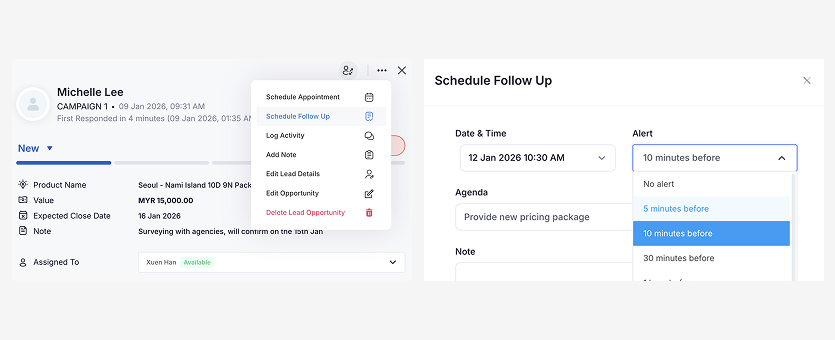
After an initial call or message, the salesperson can schedule exactly when they should reach out again, send a proposal, or arrange a meeting. Instead of relying on memory or sticky notes, save the next action directly in the To-Do List with a date and time can trigger automatic reminder alerts.
Update the team on the leads' status
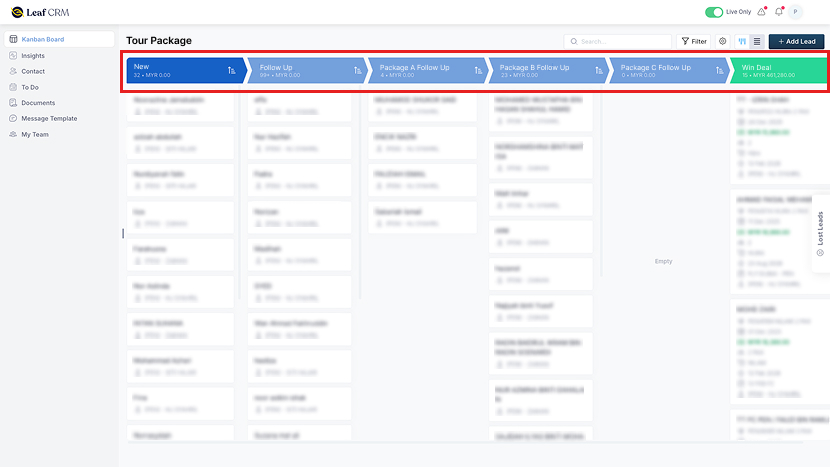
Each lead in a CRM sits in a specific stage of the sales process. As a conversation progresses, the salesperson updates the stages in the Sales Pipeline through the drag-and-drop interface. This makes the status of every deal visible to sales managers and business owners without asking the salesperson for an update.
When something happens, the stage changes. If a quotation has already been shared, the lead moves to “Proposal Sent.” If a customer confirms the purchase, the lead moves to “Won.” Progress is reflected immediately, and anyone who needs to monitor the deal can see it.
See sales performance without asking for updates
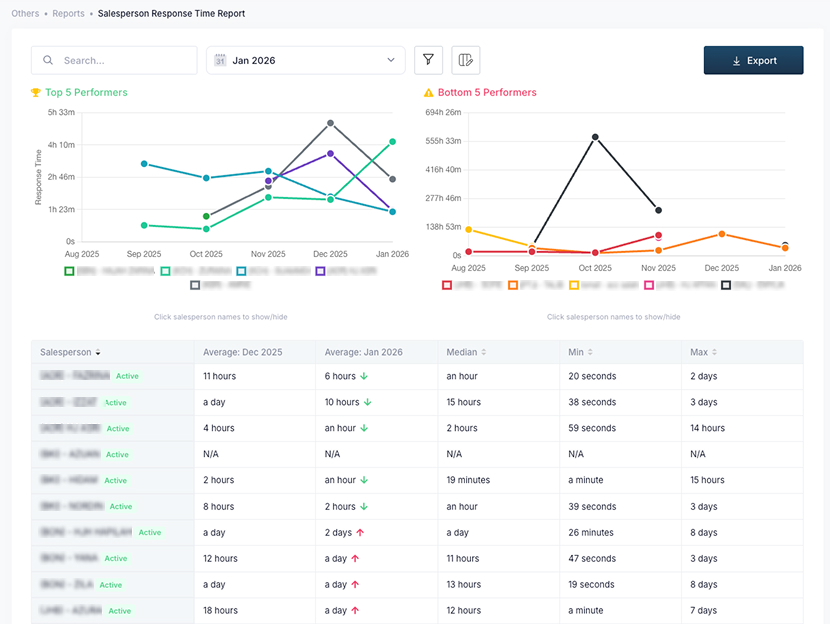
When leads are organised by stage, managers can see workload and progress at a glance with Salesperson Performance Insights. They don’t need to ask for updates or wait for spreadsheets. They can check how many leads are captured, how many are being worked on, and which ones are still waiting for action.
They also see how quickly leads are being contacted, who is handling which enquiries, and where conversations are stalling. Instead of checking individual chats or asking for reports, managers rely on live data that updates as the team works.
Track ROAS and lead conversions
Each lead captured by a CRM is tagged with its source — Facebook, TikTok, Google, etc. As leads move through the sales pipeline, the system records which channels result in conversion from serious prospects.
Leaf’s ROAS Analytics makes it clear on which channels generate actual revenue and which ones drain budget
Instead of judging campaigns by impressions or comments, teams evaluate performance based on conversion. If 300 leads come from a campaign but only 5 close, the source is visible immediately. The CRM makes it clear which channels generate actual revenue and which ones drain budget.
Compare response behaviour against conversion outcomes
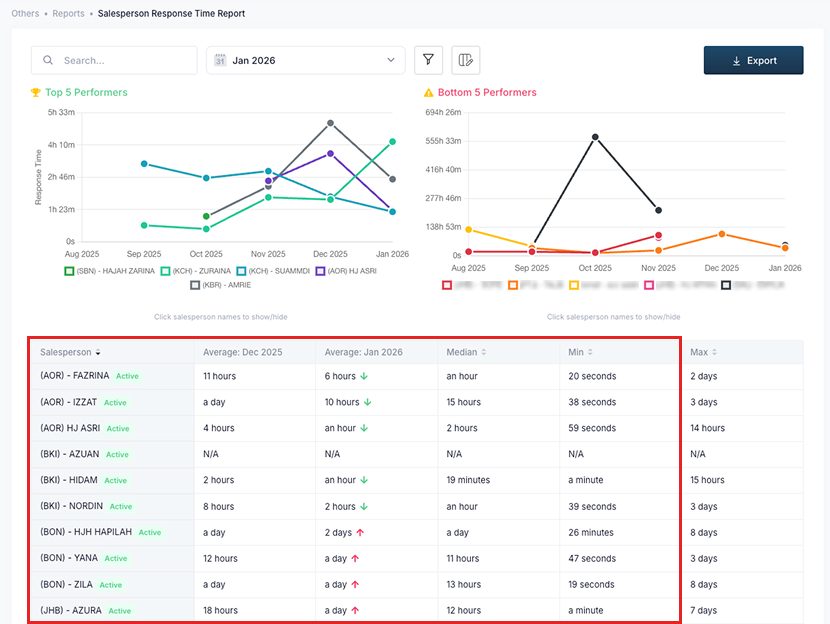

CRM can quickly show how leads are contacted and how follow-up timing affects results based on revenue and the Salesperson Performance Insights. If most successful conversions happen when a salesperson replies within the first five minutes, the team sees that pattern. If delayed responses correlate with lost deals, the data confirms it.
When should a business start using a CRM?
A CRM system becomes valuable long before a business is “big.” You should start to use a CRM the moment customer information, conversations, and enquiries are being managed manually. This is usually when customer interactions come from multiple channels (ads, social, website, phone, events) and more than one person handles follow-ups.
At that point, CRM software stops being a nice-to-have tool and becomes a foundation for managing customer relationships, preventing missed leads, and maintaining consistent customer service.
Scattered customer data across spreadsheets, chats, and emails
The team can easily single place to track enquiries, customer interactions, notes, quotations, and deal history in a single CRM dashboard, instead of WhatsApp chats, Google Sheets and emails.
This reduces errors, reduces data loss and leaks, and allows your entire customer journey to be visible to the team within the CRM database.
At this point, even a cloud-based CRM or a simple lead management CRM tool is enough to avoid losing leads and conversations.
Multiple salespeople handling enquiries without shared visibility
The moment two or more people handle enquiries, a CRM platform prevents overlap and confusion. A good CRM system assigns ownership to leads, logs activity, and makes follow-up status visible to everyone.
Instead of arguing in group chats about who replied, a CRM clearly shows who is responsible, what was said, and what needs to happen next. This is where operational CRM delivers its strongest benefit.
No structured reminders for follow-ups
If you rely on humans to remember callbacks, proposals, or appointment dates, you are at the stage where CRM systems help more than any manual method.
A CRM system can help schedule the next step, trigger reminders, and show overdue tasks.
Businesses that want stronger customer retention and higher customer satisfaction eventually implement CRM because missed follow-ups are expensive.
This is the difference between one salesperson’s memory and an actual CRM strategy.
Sales cycle involves multiple steps, documents, or decision-makers
If deals require demos, quotations, internal approvals, pricing comparisons, or waiting periods, a CRM solution becomes the operating system of your sales process.
In these cases, marketers and managers can customise the sales pipeline in a CRM for every lead, every stage: contacted, qualified, proposal sent, negotiation, closed won or lost.
When you have a multi-step journey, traditional CRM spreadsheets will no longer work because a CRM allows:
- notes for every lead at every stage
- saleskit library for a unified version
- clear lead ownership
- shared dashboard between departments
It’s no longer about “software convenience”, but the only way to manage and improve customer experience consistently.
Need clear visibility for channels that convert
Marketing teams often judge performance using surface metrics—reach, impressions, CPC, and comments.
A CRM system shows which enquiries become customers and where deals get stuck.
That makes marketing automation and lead management meaningful instead of manual.
CRM gives visibility into:
- channel performance
- campaign quality
- cost per lead vs cost per customer
- response time impact
This is why analytical CRM matters. It turns activity into patterns and patterns into decisions.
Conclusion
A CRM system isn’t just software, but the foundation that keeps customer data, communication, and follow-ups organised as your business grows.
Most companies, especially a small business, do not feel the need for customer relationship management at the beginning, because enquiries are few and everything fits comfortably in one inbox or chat thread.
However, the tipping point happens when leads start arriving from different channels, when multiple team members respond to enquiries, and when follow-ups depend on memory instead of process.
The right CRM helps your team work in order: enquiries are captured, lead is assigned, next steps are follow-ups, and conversations move through the pipeline. Managers can see progress without asking for updates. Marketing can measure which channels actually convert.
If customer interaction is part of how your business earns revenue, CRM is not something you “upgrade into later.” It is the system that lets you scale without losing control of leads and customers. Start early, learn how your team behaves, and let the data you collect shape how you sell, support, and grow.