Document Library

CRM Document Management That Keeps Your Sales Kit Within Reach

A document management CRM that keeps your sales materials in one place. Your salesperson can access and share brochures, price lists and other documents from their phone or the web to the propects.
 
A man sharing the latest version of a document with multiple clients using Leaf CRM.

What Leaf CRM can do for you?

Centralise sales kits in one system.

Keep sales team updated with latest version.

Share and open files directly without saving to phone storage.

Impress clients at every touchpoints

Keep clients informed with the latest updates and information to move a step closer to win a deal.

Without a document library

With Leaf CRM

Salesperson(s) keep their own copies of brochures and price lists.
Everyone accesses sales documents from the same library
Every salesperson in the team have different versions of the same file.
The entire sales team has access to the latest version of the file.
Finding the right document means searching through chats, folders or shared drives.
Documents are organised into folders and easy to find when needed.
Salesperson search through documents from different campaigns.
Link folders to campaigns so salesperson can quickly find the documents relevant to them.
New sales materials have to be sent to the team manually.
Upload multiple files directly into the right folder.
Documents are downloaded and stored on each salesperson’s phone.
Open documents in Leaf CRM without saving them to the phone.
New salesperson need to ask where documents are kept.
Give them access to the same organised library from the start

Set up your sales kit in Document Library with 4 steps

Document management in CRM software should not turn into a complex IT setup. You can organise your sales documents and make them available to your team in a few simple steps:

Upload your files

Drag-and-drop your selected files in PDF or JPEG/PNG format.

Sort them into folders

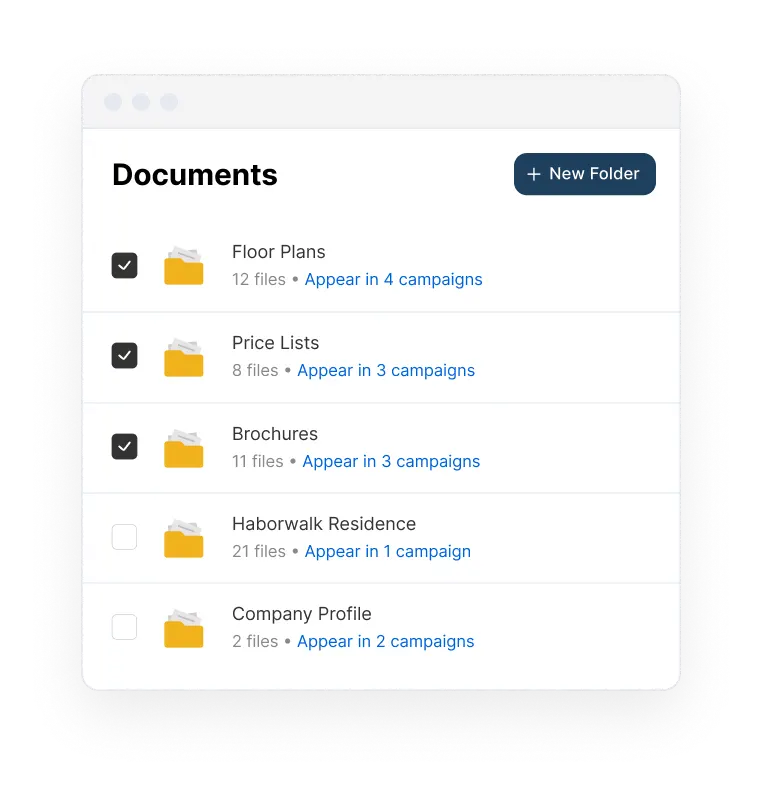
Group your files into folders based on project, product, document type or however your team works.

Link folders to a campaign

Choose which campaigns each folder belongs to, so the relevant documents are available within those campaigns. Link a folder to a campaign →

Assign salesperson to the campaign

Add the salesperson working on the campaign so they can access the relevant folders and documents from Leaf CRM.
A CRM document management system should also make it easy to keep your library organised. Rename, move or remove files at any time.
A list of folders in Leaf CRM's Document Library.

Share the latest file with a lead, straight from your phone

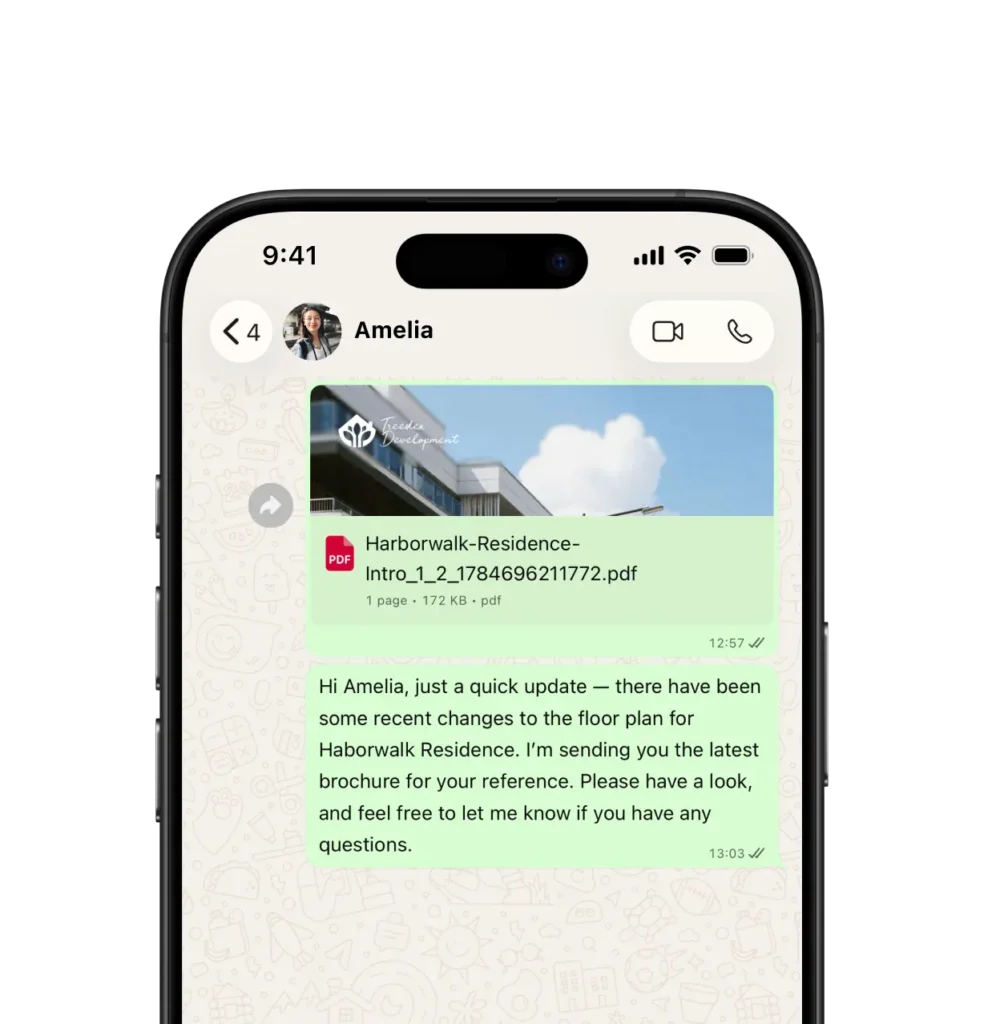
When a lead asks for a brochure, price list or other document, your salesperson can open the latest file in the Leaf mobile app and share it straight away.

Open the folders linked to their campaign.

View the document without saving it to their phone.
Share it through WhatsApp, email or another app on their phone.
Add a message template when sending it to a lead.
This saves your sales team a lot of time and improve their everyday sales workflow.
A screenshot of a WhatsApp conversation between a salesperson and a prospect, where the salesperson shared a document to the prospect via Leaf CRM's centralised document library.

See how our clients close more sales with Leaf CRM software

Tabung Haji Travel & Services Sdn Bhd logo.

“We can finally see every lead’s progress clearly. Our sales agents follow up faster, missed leads have dropped, and we can finally reduce all our manual tasks.”

Zana Yahya

Business Development Manager

100%

Leads captured and followed up

46 mins

on average time taken to contact new leads

Full Visibility

on salesperson and campaign performance

“I no longer have to worry about missing any leads because everything is tracked properly in Leaf CRM. Our consultants finds it easier to check and contact leads using Leaf CRM.”

Amber

Senior Manager of Marketing, Recruitment, and Communication

< 1 hour

Lead follow up rate decreased from days to hours

100%

Lead captured from ads

18.2s

Average minimum time taken to contact new leads

Frequently asked questions

Is the CRM document management included in the free plan?

Yes. Leaf CRM’s free Starter plan includes Document Library with 100MB of storage. The Pro plan includes 500MB, while Enterprise includes 1,000MB of storage. Compare Leaf CRM plans to find the best plan for your team.

Which apps can my salespeople use to share files?

Salespeople can share files from the Leaf CRM mobile app through apps available on their phone, including WhatsApp, email, LINE and WeChat. They can also use options such as AirDrop, Bluetooth and AirPrint without saving the file to their phone first.


Who can upload and manage files in Document Library?

Admins can upload, rename, move and remove files, organise them into folders, and link folders to campaigns. Salespeople can then access and share the documents available to them from the Leaf CRM mobile app.

Start closing more leads in less time

Upload your sales kit to let your team share it with their leads.