


Lead routing is the set of rules that decides which salesperson gets each new lead and how fast they get it.
A lead form comes in at 9pm from your Facebook ad, landing in a shared inbox. On Monday morning, three reps see it, two assume someone else has it, and nobody calls. By Wednesday the lead has been bought from someone else. This is where your sales team demands lead routing.
This article covers the definition and importance of lead routing, six ways to route a lead, what a routing rule actually looks like when you build one, and the four mistakes that quietly cost you deals.
Key Summary
- Lead routing is a set of rules that decides which sales rep gets each new lead and how fast they get it.
- There are 6 lead routing methods:
- Round-robin routing
- Territory-based routing
- Skill-based routing
- Performance-based/weighted routing
- Availability-based routing
- Priority/account-based routing
- The golden rule: Every lead must be assigned to a salesperson within minutes for a higher chance of closing sales.
What is lead routing?
The lead routing system in the CRM checks the lead’s information against a set of predefined rules. These rules determine which salesperson should receive the lead.
The process follows four simple steps:




1. Lead is captured into the CRM
2. CRM checks the lead against the routing rules
1. Lead is captured into the CRM
3. Lead is assigned to the right salesperson
4. Salesperson receives the lead for follow-up
You may also come across the terms “lead distribution” and “lead assignment.” They refer to the same process as lead routing. That is, deciding which salesperson receives an incoming lead.
Lead routing, however, should not be confused with lead scoring. Lead scoring is when a salesperson determines how qualified or valuable a lead is in closing a deal.
Within a lead routing system, the CRM can assess lead information using criteria such as:
Geographic location: Match leads by country, state, territory, or time zone.
Company size and revenue: Route larger companies and enterprise-related leads to an experienced salesperson.
Industry: Route leads to a salesperson who specializes in a particular industry.
Product interest: Direct leads to salespeople responsible for a particular product or service.
Existing customers: Assign returning leads to the same salesperson
Existing account: Assign new leads from the same organization to a salesperson that has already been dealing with them.
Salesperson availability: Route leads only to salesperson(s) who are available to receive them.
Why lead routing matters?
Effective lead routing helps businesses connect incoming prospective customers with the right sales representative instantly and accurately.
- Improve speed to lead: Companies responding to a lead within five minutes are far more likely to qualify it than those that wait ten minutes or more.
- Match the right fit: It sends prospects to reps who have the exact skills, territory, or product knowledge needed for that specific deal.
- Boost team productivity: Automation removes manual assignment tasks so sales staff can focus purely on selling.
- Prevent revenue leakage: It stops good leads from getting lost, ignored, or stuck in a queue.
- Enhance the buyer experience: Customers talk to a qualified helper right away instead of getting transferred around.
The six ways to route a lead

Round-robin
Leads are assigned by turns in a fixed order. Round robin lead assignment is a fair distribution method. However, this method does not have customized assignment rules. So, your biggest deal can land with your newest hire rather than an experienced salesperson.
A marketing or sales manager can manually transfer leads with big opportunity or deal size to an experienced salesperson.
Territory-based
Assigned by geographical location or time zone. This includes country, state, or time zone. Each territory is assigned to a specific salesperson or sales team. So leads from that area are automatically routed to them.
For example, leads from Kuala Lumpur can be assigned to one sales team, while leads from London are assigned to another. This is commonly used by businesses where salespeople are responsible for specific geographic markets.
One limitation is that lead volume may not be evenly distributed across territories. A salesperson covering a high-demand area may receive significantly more leads than someone covering a quieter territory.
Skill-based
You tag each rep with the products or industries they know. When a lead needs that knowledge, the CRM hands it to the matching expert.
Picture a lead asking about firewall setup. Your security specialist takes the call and answers each technical question. That expertise builds trust and speeds up the deal.
The catch is that one skill often belongs to one person. When that specialist takes leave, leads pile up. Thus, it would be better if you could name a backup rep for each skill.
Weighted (performance-based)
The CRM gives more leads to the reps who close the most deals. You set a weight for each rep based on their win rate.
Let’s say a salesperson closed 12 deals last quarter, and three other agents closed four each. The manager sends her 50% of new leads.
However, a fixed weight keeps feeding a top rep during a slow month. New hires also struggle to earn leads without a track record. In this case, you can give them a starter share for 90 days. After that, let their performance speak for themselves.
Availability-based
Speed comes first here. The CRM checks each rep’s live status, like online, on a call or away, and routes the lead to someone free.
A parent fills in a tutoring center’s trial-class form at 3pm. Two of five advisers are mid-call. The CRM skips them and sends it to one of the other three.
Yet the best match might be the rep who is busy. To keep both speed and fit, layer a skill or territory rule on top.
Priority / account-based
Some leads come from companies you already sell to. The CRM spots them by email domain and sends them to the account owner.
For example, Phil manages your logistics client. When a finance manager from your client’s company downloads your pricing guide, the CRM reads @abclogistics.com and routes the lead to Phil. Since he knows the history, he can reply with context.
This depends on clean CRM data. Duplicate accounts, outdated owners, and personal Gmail addresses break the match. Whenever a rep leaves, reassign their accounts.
Availability also works on top of the other five methods. Ask one question of every rule you write: is that person actually there? A rule that hands a 9pm lead to a rep who finished at six is still a lost lead. Mark reps as away when they are off or asleep, and let the rule skip them. Skipping this check is how leads end up sitting untouched overnight
| Method | How it works | Best for | Watch out for |
|---|---|---|---|
| Round-Robin | Assigns leads one by one to reps in a fixed, repeating loop. | High lead volume, small teams, and uniform deal values. | Ignores individual rep skill sets and lead size variations. |
| Territory-Based | Matches prospects to reps based on geography or time zone. | Field sales teams or regional target markets. | Uneven lead volumes across different geographic locations. |
| Skill-Based | Channels leads based on a rep's product or industry expertise. | Highly technical products or niche industry verticals. | Can create major bottlenecks if the specialist is unavailable. |
| Performance-Based | Sends a higher percentage of quality leads to top closers. | Teams with wide gaps in rep performance or closing rates. | Requires continuous system updates and can frustrate newer reps. |
| Availability-Based | Routes lead only to reps who are online and active in the CRM. | Driving down response times for instant demo requests. | Neglects conversational quality and match accuracy if prioritized alone. |
| Priority / Account-Based | Matches incoming contacts directly to existing CRM account owners. | Account-Based Marketing (ABM) and enterprise sales motions. | Complex to set up and requires very clean, accurate CRM data. |
What a routing rule actually looks like
A routing rule is built with AND/OR conditional logic. This lets you control exactly how leads are assigned to each salesperson. In plain words, a rule looks like this:
- If the lead came from the Instagram campaign AND the budget field says more than 5,000, send it to the senior rep.
- If the senior rep is marked away, send it to the next available person.
- If nothing matches, send it to the team inbox and alert the manager.
That is automated lead routing in practice: one condition, one backup, one catch-all.
When setting up instant lead assignment rules, ask two things for every setup you build.
- What happens when no rule matches?
- What happens when nobody is free?
If you cannot answer both, it is harder to set the conditional logic. Leads end up not getting assigned and go into the unassigned leads category.
A rule is only half the job. The rep has to know now, not at the next inbox check. Send the alert to their phone through a mobile and web app. Then a 9pm lead reaches a person, not an empty screen.
You can build a rule like this in Leaf CRM, and the free plan includes basic lead distribution for up to three reps.
Lead routing best practices
Here is a list of lead distribution strategies that you may find helpful for routing.
1. Set a time limit and write it down
Decide how fast a lead must be contacted, write the number down, and check it every month. Fifteen minutes is a good place to start.
2. Always have a fallback
Consider this scenario: when no rule matches, who gets the lead? Assign a default owner or queue so every prospect receives immediate follow-up.
3. Handle nights and weekends on purpose
Most leads that go cold arrive outside office hours. Automated routing keeps off-hours leads warm until reps return.
4. Keep the rules simple enough to explain out loud
If nobody on the team can describe the rule, nobody will trust it. Only clear, simple logic builds trust and keeps your sales team focused on closing.
5. Check it monthly
As mentioned in the previous section, paying monthly could cost up to 50% more than annual billing. If you have made up your mind to implement a long-term CRM service, subscribing annually could save you a lot.
Hence why choosing a CRM like; however, if you are not sure which one to choose, paying monthly to give it a try is fine.
What to look for in lead routing tools
To find the most suitable lead routing tools for your business, here is the checklist:
- Can you build and change the rules yourself, without a consultant?
- Does it know when a rep is unavailable?
- Does the rep get an alert on their phone, or just an email?
- Does it show you response times per rep afterwards?
- What does it cost per person, and is there a free plan to test it with?
There are two kinds of tools. Big routing platforms sit on top of Salesforce and handle hand-offs across hundreds of reps. Small-team CRMs build routing in, so the CRM and the lead routing system are one thing. Buy the platform if you have a revenue operations team. Buy the CRM if you do not.
Our Leaf CRM is the second kind. You build rules on any field. Join them with AND/OR, use your own custom fields, and skip reps who are away. Reps get a phone alert in seconds.
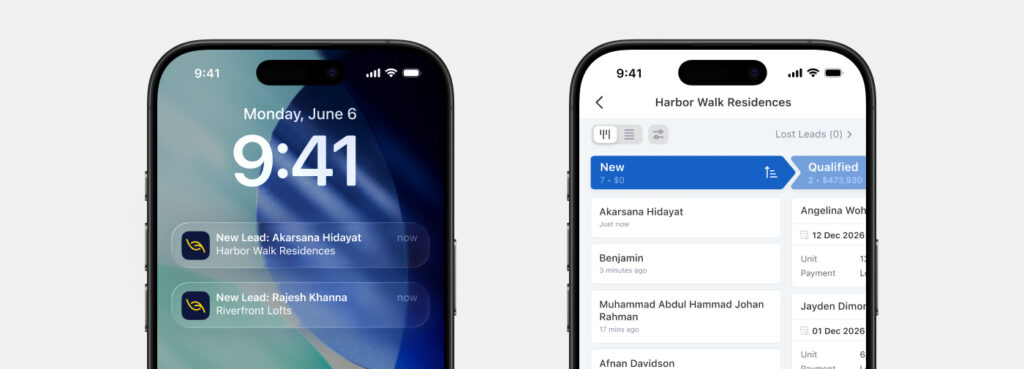
Leaf CRM has no forecasting, no quotes, and no CPQ. The starter is free for up to three salespersons with basic lead distribution. Pro is $32 per person per month. See how this lead distribution software builds a rule.
Conclusion
In this lead routing 101, we understand that every lead needs an owner within minutes, and a rule is how you make that happen without thinking about it.
If you are planning to take the first step in the lead routing process, start with one simple rule and a fallback. Do not try to build all six methods on day one. However, remember, a two-person team taking five leads a week does not need this yet.
Start free with no credit card.
In Leaf CRM, the free Starter plan includes basic lead distribution for up to three salespersons. Book a demo with us if interested.
Frequently asked questions (FAQs)
What is lead routing in simple terms?
The automated process of assigning inbound leads to the suitable sales rep.
What is the difference between lead routing and lead distribution?
None, these two terms carry the same meaning.
What is the best lead routing method?
It depends on your team size, sales model, and lead volume. Round-robin splits leads evenly but ignores rep specialization; skill-based increases conversions; and priority-based feeds hot leads to top closers. Combining several of them beats just picking one, and automation carries the load once volume climbs.
How fast should you contact a new lead?
Ideally, within five minutes or less to give your sales team the best chance of converting them. This is known as the 5-minute rule. A lead who just filled in your form is still holding their phone and still thinking about you. But with Leaf CRM, the average minimum time taken to contact new leads is 18.2 seconds.
Do you need special software for lead routing?
No, a small team can do it manually, and it works until volume grows. For big agencies/teams, it would be great to choose an automation tool for lead routing to boost efficiency and prevent leads getting cold.
What has AI changed in lead routing?
AI could improve routing’s adaptability by analyzing signals and context that strict rule-based systems would overlook.
How can Leaf CRM help in lead routing?
We automate your lead routing by instantly capturing inquiries from ad platforms and forms, applying flexible distribution rules to assign them to sales reps, and sending real-time notifications to enable immediate follow-up.

An SEO content writer and a researcher focusing on CRM, digital literacy and AI literacy.