


Sales force automation (SFA) refers to a process of using technology to automate repetitive admin tasks in a sales cycle. Modern SFA combines independent selling steps like lead tracking, pipeline management, and follow-up processes into a single workflow.
In this article, we’ll talk about the four processes that truly matter for a small team.
TL;DR Top 4 sales force automation processes using SFA tools that matters to small teams
- Lead capture: Automatically collect and record leads from different sources.
- Lead assignment: Distribute incoming leads to the right salesperson based on predefined rules.
- Communication: Help salespeople contact and follow up with leads from one system.
- Pipeline management: Track each lead's progress through the sales process and identify leads that need attention.
A brief history of sales force automation
The term appeared back in the early 1990s. Tom Sieble, founded Siebel Systems, branding it as a sales force automation provider. So it became a category that combines database marketing and contact management, centring it around the sales process.
The system grew largely within the industry, and over time, tech experts coined a newer follow-up term: customer relationship management (CRM).
So the “Salesforce” in Salesforce CRM is not exactly a name invented by the founder. But their ingenious marketing strategy made them a good example of proprietary eponym in the industry. Though some resources point to Tom Siebel coining the term, the real “culprit” who actually coined it remains unknown…
Because of this, many people get confused when they hear sales force automation. So let’s get two things out of the way:
- It’s not the same as Salesforce, the CRM company.
- It’s not marketing automation.
What is sales force automation software?
Sales force automation software is a tool that automates repetitive sales tasks such as assigning leads, tracking follow-ups, and updating lead statuses. This reduces manual work and helps salesperson(s) stay organized throughout the sales process.
In other words, it’s the part of a CRM that replaces the old pen and notebook and disorganized work.
Sales force automation vs CRM: The Differences
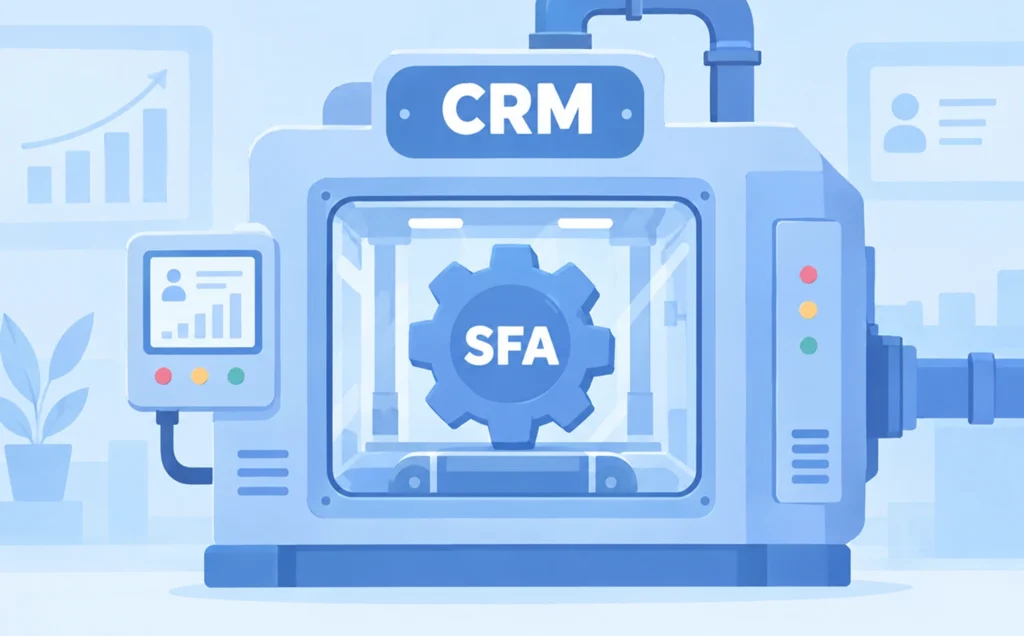
A CRM manages the broader customer relationship and sales process. Sales force automation in CRM automates sales tasks such as lead assignment, follow-ups, and activity tracking.
To make it easier to digest, think of it as a gear inside of a machine. The machine is CRM software. The two cannot work without the other because SFA is a part of CRM.
While CRM is the whole concept and realization of customer relationships, SFA is the selling part inside it. If you blurt out “CRM sales force automation” enough times, these words will definitely lose their meanings to you.
Though you should know that it’s only because big vendors oftentimes sell it as a separate paid module. Small-team tools just build it in and never use the word, so this begs the question: what do you really need? That’s what we’ll cover today.
“How do I know if I already have SFA…?”
If your CRM software already assigns leads and logs calls on its own, then you already have SFA built-in.
| Systems | What it covers | Who it's for | What you buy |
|---|---|---|---|
| Marketing Automation | Top of the sales funnel | Marketers | A software |
| SFA | Middle of the sales funnel | Salesperson & sales manager | A module |
| CRM | Bottom of the sales funnel | Marketers, salesperson | A software |
What sales force automation tools actually do: SFA processes
The system covers 12 processes, but there are only four that matter to a small team.
1. Catching the leads (lead capture)
Lead capture is the process of collecting a potential customer’s personal information so the lead can be nurtured and converted. The simple idea behind this is to have the leads fill out your form, be it through pop-ups, landing pages, or quizzes. This feature of the software allows sales teams to automate the manual tasks of keeping records of leads, making it far easier for anyone to refer to it.
2. Lead assignment (giving the leads to a rep)
Lead assignment is the process of distributing leads to sales reps accordingly. They’re simple instructions that tell your system what to do with each lead. According to Oracle, there are two rules when it comes to this process.
1. Rule-based
For example, if a lead was caught from an Instagram campaign and the budget field is over $5,000; this rule would automatically send the lead to a senior rep or whoever is next in line. This way, the chance to close deals with the lead is higher.
2. Territory-based
This rule assigns leads according to the region of the closest sales reps. Aside from the geographical similarities, they can also be assigned according to shared characteristics. Extra rules to qualify the leads even further can also be applied.
Your system can’t provide quality leads to the right guy if its lead assignment isn’t good. That’s why you need to choose the right one.
3. Contacting them (contacting and messaging your leads)
This feature enables its users to connect with their leads using the same CRM software they work with. Many salespeople work on the go. So, mobile sales force automation is necessary for their workflow and productivity.
In other words, apps. If you’d like to give it a try, Leaf CRM is equipped for both website and mobile app integration.
Not only that, the key to close a deal is to consistently follow up with the leads. This makes the efficiency in contacting them a necessity. Once you’ve equipped your salespeople with a CRM, you’ll definitely see improvements in your sales performance.
4. Keeping track of the lead progress
Pipeline management helps you visualize the current progress of your leads. It gives you a simplified look at what your team needs to work on. In fact, tracking what’s happening with your leads throughout the sales process is one of its best features.
Besides moving the deals according to the stages they’re at, you can also view your salesperson’s performance (which Leaf CRM is entirely capable of). With that said, every record of your lead status matters. It helps to see whether your salesperson(s) are contacting your leads or not.
For example, lead’s status can be tracked as active, unattended, or stale.
1. Active leads
Active leads are valid leads that have been assigned to a salesperson and are still engaging with the brand. These leads will usually go through the sales funnel process to close.
2. Unattended leads
Unattended leads are leads that have been assigned to a salesperson, but nothing has been done about them (unless you count gathering dust). These leads are stuck in the “New” stage of the pipeline.
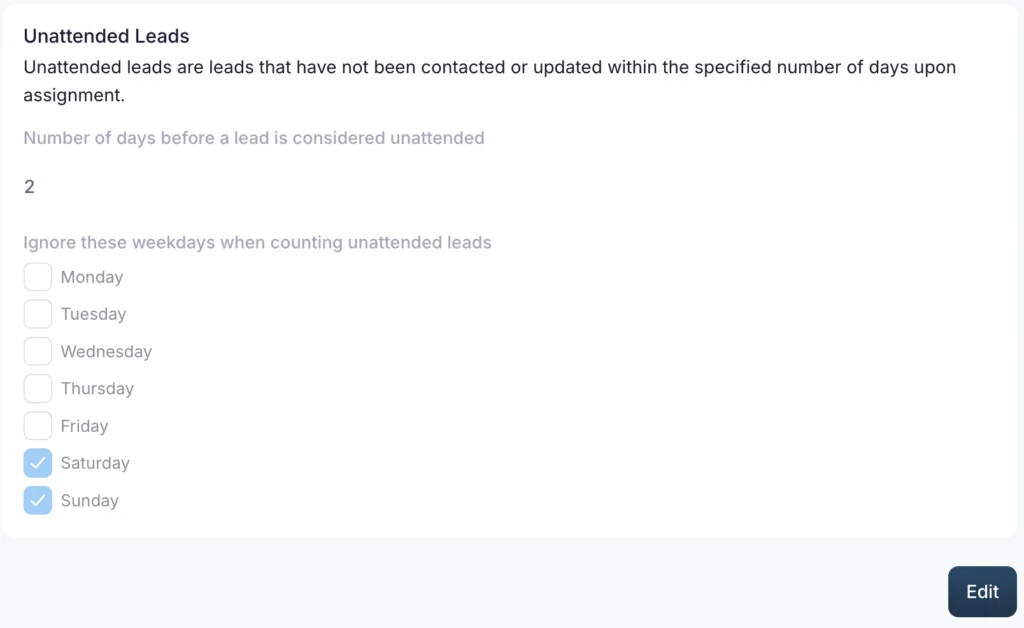
A screenshot of Unattended Lead rules settings in Leaf CRM
3. Stale leads
Stale leads have a bit of activity going on. But have gone cold for a certain number of days. A stale timer can often be set within your CRM software. For example, in Leaf CRM, you can set your system’s stale timer at X number of days.
After the “expiry date” has passed, the lead goes stale. As a manager, you have to alert your salesperson about it. Imagine if a salesperson’s last activity with a lead (let’s call her Samara Morgan) was 8 days ago. If nothing is done, you could waste a potentially qualified lead from a careless mistake.
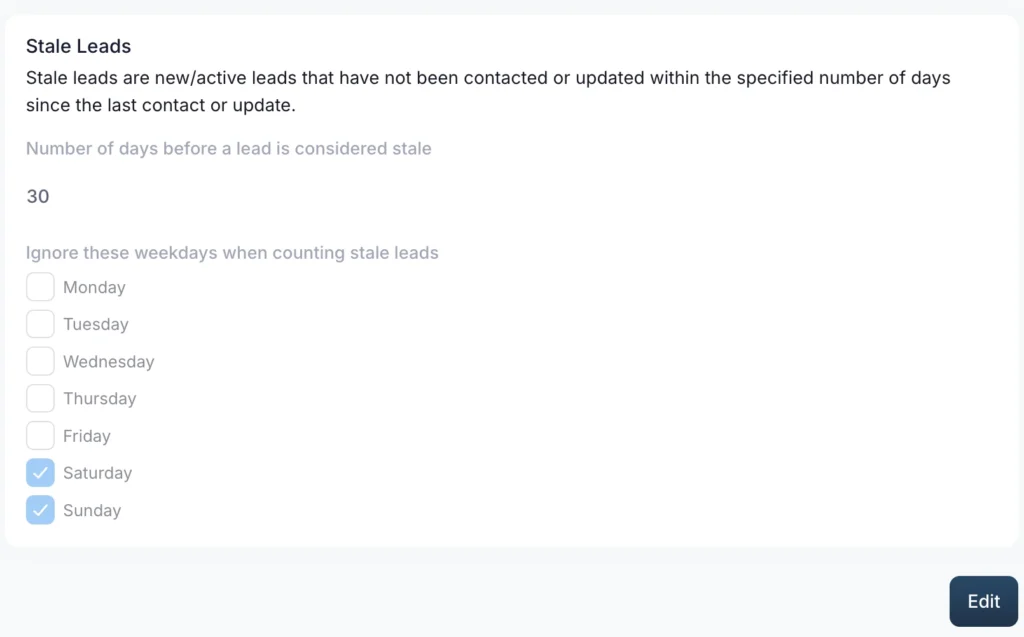
A screenshot of Stale Lead rules settings in Leaf CRM
Overall, lead capture, lead assignment, communication, and pipeline management serve as the main processes for small teams.
Aside from these 4 sales force automation processes, the table below sums up additional processes that matter to a bigger team.
| SFA parts | What it means |
|---|---|
| Lead capture | Leads captured from ads, forms and social without anyone typing them in |
| Lead assignment | The lead goes to the right salesperson on its own |
| Contact and messaging | Calling and messaging from inside the tool |
| Pipeline management | Deals move through named stages |
| Activity and task automation | Automatic to-do lists and reminders |
| Mobile access | Reps work from a phone |
| Reporting | Managers see what is happening without asking |
| Ad spend reporting | Which ads actually profit |
| Document management | Everyone has the latest file |
| Quotes, CPQ (configure, price, quote), contracts | Building and sending priced quotes |
| Forecasting | Predicting next quarter’s revenue |
| Territory management | Splitting customers up by region |
The benefits of sales force automation
Now, we’re not interested in all bark and no bite. Most benefits are things conjured up by the writers without actual evidence. So here are some with actual data to back them up.
1. Faster response
Sales force automation makes it easier for a rep to immediately get in contact with their leads. It automates the lengthy process of the work, improving the speed to lead. Besides that, it also increases the efficiency of your salespeople. Instead of focusing on repetitive tasks such as data entry, they can now focus on engaging with the leads.
For example, our client Tabung Haji Travel, found that their leads are now contacted in an average of 46 minutes as of October 2025. Their team consisted of 45 users. When it comes to successful leads, speed is everything, and features like instant lead assignment from LeafCRM help alot. LeadAdvisors.com also states that the steepest drop in winning a lead is 1 hour.
2. Less admin work
Manual admin work takes time, and you can’t avoid the inevitable human errors. It’s part of our nature. Since the system is directly built into your CRM, you’ll find your data, schedules, and progress all laid out. This makes it easier for your administrative team to work with, saving plenty of time and mistakes.
“What does less admin work have to do with the benefits?”
Well, another client of ours, GMH Digital Marketing Solutions, is now able to reduce their follow-up from 4 hours to 5 minutes, saving 5 hours every week. Their General Manager, Pah Phin Shang stated that with less admin work, they’re able to adjust their targets. They can now focus on bringing in quality leads instead.
3. Oversee your progress
You’ll find that it is much easier for you to keep track of every lead you’ve captured. Not just that, managing the schedules is also easier once you’ve got the software. The interface gives your sales reps a comprehensive view of the leads they’re assigned to.
The International University of Malaya-Wales managed to cut down their follow-up from days to just under an hour. To be specific, it only takes them about 18.2 seconds to contact their new leads now. Sales follow-up makes sure that your leads remember your existence.
What to look for in sales force automation tools
Efficient sales force automation tools let your team streamline their work. So here’s a checklist of what you want to look for:
- Does it capture leads from the places you actually advertise?
- How fast does a lead reach a rep, and does the rep get an alert?
- Can you build the assignment rules yourself, without paying a consultant?
- Will your reps actually use it on a phone?
- What does it cost per person, and is there a free plan to test it with?
There are two kinds of tools for SFA. Tools that are meant for big companies, such as Salesforce and Oracle, are suitable for big teams. But there are tools meant for smaller teams.
Leaf CRM is one of them. Our system integrates the core SFA features within it. It does the four everyday parts and skips the rest. Unfortunately, there are no quotes, no CPQ, and no forecasting. If you need those, you need a bigger tool.
Conclusion
A small team only needs lead capture, lead assignment, contact, and tracking. Not more, not less.
Sales opportunities can come from anywhere, but if your leads come from ads or social media, then it’s best that you start with capture and assignment. The rest can wait!
Leaf CRM is designed to support SFA. Although it has many useful free features for your teams, it’s probably not the best for a big field team. Instead, consider checking out the enterprise suites for your enterprise needs.
You can also create an account for free. No credit card needed.
Frequently Asked Questions (FAQ)
1. What is sales force automation in simple terms?
It’s an AI-powered automation tool that helps with repetitive tasks. Such tasks are lead management, performance analysis, and sales forecasting. SFA software is a part of the CRM system. It also helps with contact and messaging, pipeline management, activity and task automation, mobile access, reporting, document management, quotes, CPQ, contracts, forecasting, and territory management.
2. What is the difference between SFA and CRM?
Few. Sales force automation is actually a part of the CRM system, so most of them already have it built in. It’s often distinguished as a separate entity because it can come in as a separate module for a plan.
3. Is Salesforce a sales force automation tool?
Yes, but you should know that Salesforce is the name of the company. ‘Sales force automation tool’ is a system within a CRM. The company is a CRM company, and the system is a part of it. There’s a lot of confusion surrounding sales force automation in CRM. It’s just the term that came before the newer one.
4. How much does sales force automation cost?
There are free trials, but in general, one can cost about $25 up to $300 or more, depending on the features. If you’re interested, Leaf CRM provides a free plan for monthly and annual subscriptions. Leaf’s monthly pro plan is only $32/person as of September 2026.
5. Which of the following represents sales force automation?
A sales force automation system is represented by automating lead assignments and contact logging. It also includes activity tracking and pipeline updates for your leads, helping sales teams mechanize sales operations and focus on tasks that matter. For example, contacting and following up with their leads.
6. What is sales force automation in CRM?
Sales force automation streamlines the repetitive tasks of a sales rep. It uses predictive AI to tackle certain tasks faster. It is also built directly into your CRM. By automating the tasks, the system allows sales teams to focus on improving their performance instead. Some tasks that this software includes are lead capture, lead assignment, sales reporting, and territory management.
7. How does sales force automation work?
Sales force automation streamlines the repetitive tasks of a sales rep. It uses predictive AI to tackle certain tasks faster. It is also built directly into your CRM. By automating the tasks, the system allows sales teams to focus on improving their performance instead. Some tasks that this software includes are lead capture, lead assignment, sales reporting, and territory management.
Glossary
- Sales Force Automation (SFA): The use of technology to automate repetitive tasks and processes throughout the sales cycle.
- Sales Force Automation Software: Software that implements SFA to automate and manage sales activities such as lead tracking, follow-ups, pipeline management, and reporting.
- Customer relationship management (CRM): A system for managing a salesperson’s interactions and relationships with leads, prospects, and customers.
- Sales Process: A series of steps a sales team takes to build a business relationship with prospects to close sales.
- Salesforce: The name of a cloud-based software company that provides CRM and other tools for sales, marketing, customer service, and business operations.

Nabilah Haidir is a Content Writer Intern at Red Ant Technology. She had written a book entitled 'A Cup of Poe-e-tea', alongside designing a website as additional substance for it. She had also published an extended abstract about it under UiTM'S Journal of the Language and Society Faculty.