


Unlike most robins, round-robin isn’t a phrase to describe a fat bird. Round-robin lead assignment is actually an automated method to distribute each of your new leads to the next salesperson in line.
An unmanaged team may find it hard to keep track of their leads. Juggling between confusing each other and attempting to make your own assignment system is a recipe for disaster. One salesperson grabs every good lead; the others sit idly. The rotational turns you keep in your head slip because everyone is a mess.
This article will tell you how this method works, when it helps, where it breaks, and how to simply set it up.
Key Takeaways
- An automated method in a CRM system that distributes new leads evenly to salespeople.
- A trigger is fired every time a lead is captured into the CRM. The system automatically assigns the lead to the next eligible salesperson in rotation.
- Round-robin is a simple, fair, and fast lead assignment mechanism.
What is round robin lead assignment?
Round-robin lead assignment is an automated method that shares new leads evenly across a team by rotating the members in a set order. One each, then repeat. This method ensures equality between the team and no gaps in terms of cherry-picking.
There’s been some confusion about the difference between ’round robin lead distribution’ and ’round robin lead assignment’. The truth is, they’re the same thing.
There are two main variants of this method. The Weighted Round Robin (WRR) distributes more leads to high-performing reps. Meanwhile, the capacity-based round-robin skips any reps who already have too many open leads.
How round robin lead assignment works
Simple answer? By taking turns. Complicated answer? By sequentially giving each lead to a salesperson to ensure even distribution.
To illustrate, you have a sales team made up of Amy, Ben, and Aisyah. Every day, a new lead comes in through your software. Now, what would the rotation look like? Who would receive this lead first?
That would be Amy, because she’s the first one on the list. Followed by Ben and Aisyah. After each of them has received a lead, the loop would start over with Amy, giving her the fourth lead. The rotation continues.
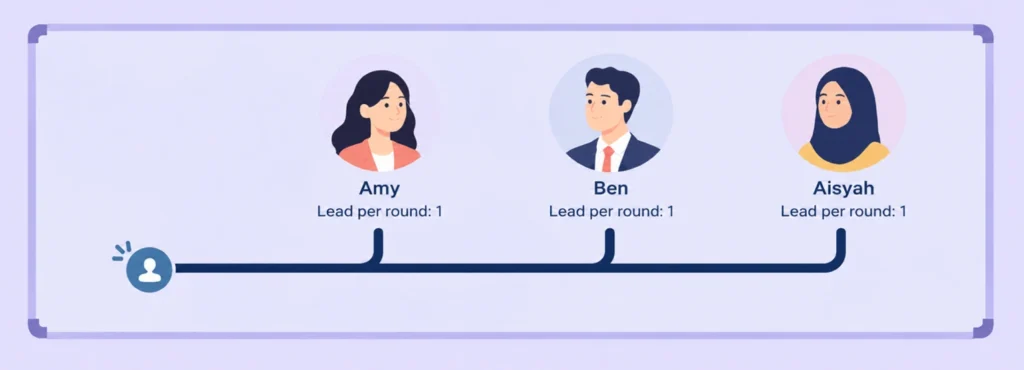
There are five steps in how the round robin assignment works. They’re fairly simple, which is why this system is a hit in the first place.
- Trigger fires: A lead filled out a form or generally interacted with your ad. This tells your system that you got a lead.
- Eligibility check: The system checks your salesperson’s eligibility, whether they’re at max capacity or disqualified. It also checks a salesperson’s availability to decide whether the assignment should be skipped or not.
- List reference: It references the list provided within the software to decide who’s receiving the lead. The system checks who’s next in line.
- Lead distribution: Assign a lead to a salesperson.
- Real-time update: Update within your CRM software. Now you can keep track of which leads are assigned to whom.
Because of how simple and fair it is, many CRMs have included it as a standard feature. The system is fair and quick. It cuts down dreadful marketing tasks like manually downloading and assigning leads.
Amber, Senior Manager of Marketing, Recruitment, and Communication at IUMW (the International University of Malaya-Wales) finds that the round-robin lead assignment in Leaf CRM has greatly reduced their missed leads. They experience a 100% capture and assignment rate to their salesperson.
The benefits of round robin assignment
We keep talking about how simple this system is, but we haven’t really delved into its benefits, have we? The main idea behind the round robin lead distribution is to quickly configure who’s next to be assigned. That’s why automating this process saves a lot of people, a lot of time.
Fairness for each salesperson
A machine has no bias until you make it to be. With the round-robin, every salesperson has a chance to receive an incoming lead to pursue.
The system only ensures that the lead it captured is assigned to the next rep on the list because fair distribution means balanced workloads.
Therefore, when you use round robin, it ensures that your team isn’t too burdened by the amount of work.
Improve speed to lead
Manual lead assignment can take hours to days. This wastes precious time that could be used to contact your leads instead. And in an organization, speed to lead is super important. You need to immediately contact the lead as soon as they submit a form. Not after days.
And if you download and assign leads manually to your sales team, you can never be able to contact the leads fast.
Of course, if you’re reading this, then you probably already know about that. The round-robin’s key benefit is speed. Speed to lead matters because it means that your lead’s interest is still fresh.
The longer you take to assign a rep to their lead, the longer they will take to contact them. Therefore, the lower the chance of closing a deal.
Highlight true priorities
Round robin assignment distributes your leads evenly and helps your team to focus on winning their leads. Not only that, but the clear distribution also gives your salesperson(s) a straightforward idea of how things are looking.
Your reps are there to actually pursue your leads or prospects. If they spend all their time managing which lead goes to who, then they’ll never be able to thoroughly do their job. Now, they can prioritize their tasks better.
With a quick-working distribution system using the round robin rotation, efficiency within your team will improve as well.
How round-robin falls short
A plain built-in round robin is straightforward. It’s a blank slate, and in order to reach its goal, it won’t take into account a salesperson’s experience or a lead’s weight. Like any instrument, if you don’t fine-tune it, it won’t work that well.
As straight as a ruler
Because the system evenly assigns every lead to a rep. it doesn’t understand what lead frequency is. Frankly, it will only distribute according to the list, making sure that everyone receives a fair amount across your entire list.
The system could assign the same amount of leads to a new salesperson and your best closer. It doesn’t know which one has more experience and should have a higher lead frequency.
Leaf CRM addresses this with our customizable lead frequency feature. An admin of the software can assign any amount of lead frequency to their reps for team efficiency.
If you need more than this, then you should consider getting either a WRR or proper lead routing instead.
No workload capacity
Workload capacity refers to the process of measuring tasks, responsibilities, or projects that a team or an employee can handle within a duration of time. A blank-slate round-robin doesn’t understand this.
Round-robin assignment distribution focuses on ensuring that each rep gets an equal amount of leads. It would give the 50th lead to a rep without noticing the 49 untouched ones.
If you don’t tweak it to make sure that it knows the largest capacity, it will keep doing that, disregarding any workload balancing.
The rotation must be coded to skip those who are busy or unavailable. So, the system needs a way to understand this, which is why ‘Away Mode’ is the perfect fix for this (which Leaf has!).
How to set up round robin lead assignment
Thanks for taking the time to read up until here. Thank goodness someone still has their attention span (yipee!). Now, let’s get straight to the point. Your lead assignment rules can get you far with the round-robin. Not to mention that setting it up is simple; you only have three items to worry about:
1. Add salesperson to CRM workplace
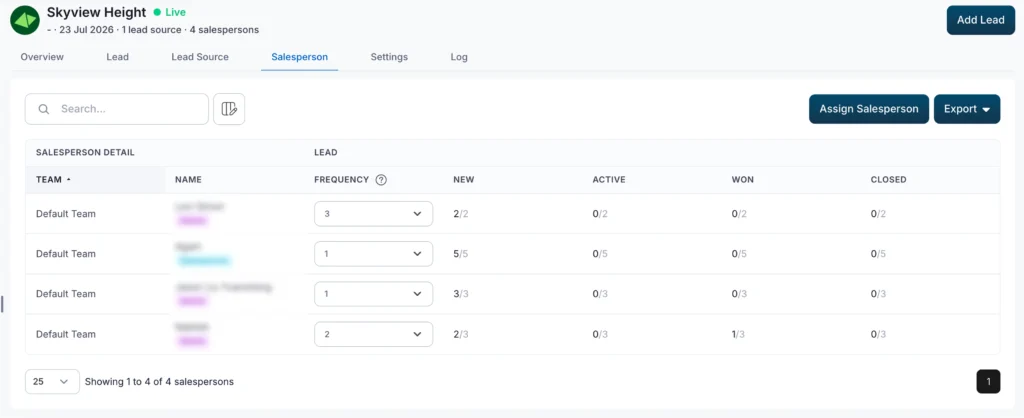
A screenshot of Leaf CRM’s settings, showing the list of sales reps.
An admin adds each salesperson as a user, then adds them to the campaign’s salesperson tab. Here’s a sample of what it would look like. Listing your reps indicates to your system that this is the list it will refer to for lead assignment.
Besides this, you can also immediately set the lead rules using the software. Customize it to you and your team’s needs.
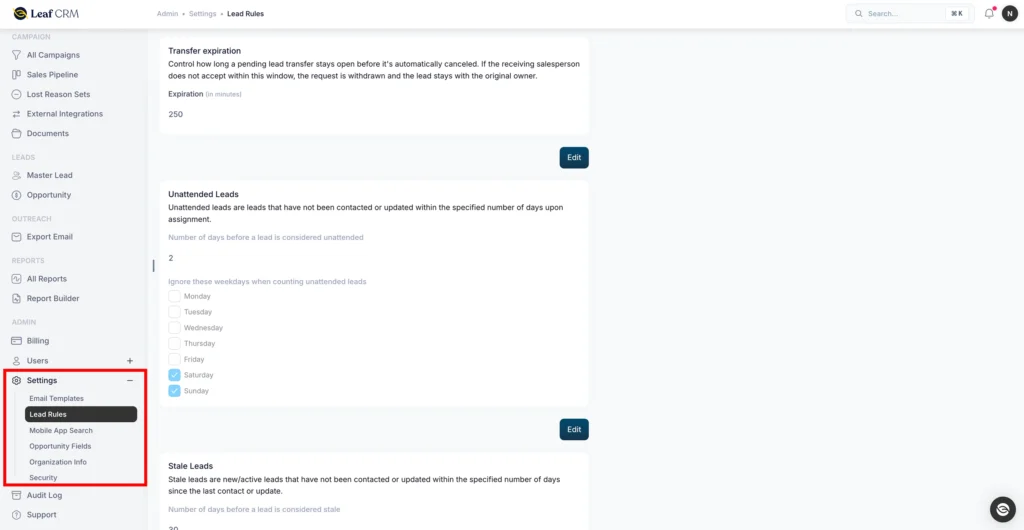
A screenshot of Leaf CRM’s settings, highlighting the lead rules button for round robin distribution.
2. Make sure that the reps receive instant alerts, not an email they see tomorrow
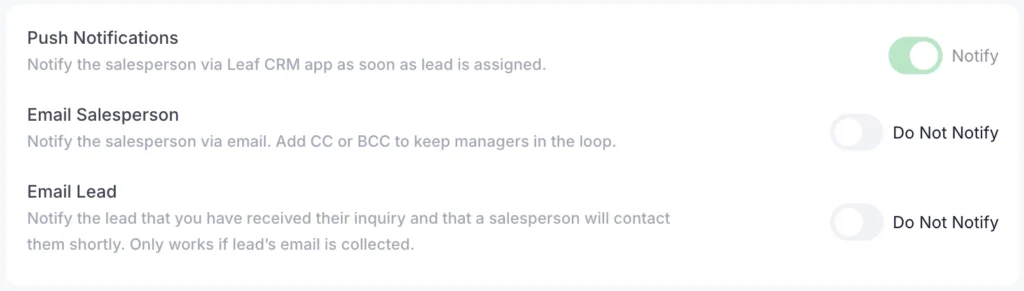
A screenshot of the toggles for instant alerts once inbound leads are received in Leaf CRM.
A notification ping immediately alerts a rep that they’ve got an assignment. Let’s be honest, no one really checks their email. That’s why every CRM software should have a mobile app version of their product. An email would work as an extra reminder. Especially if someone’s mainly using their desktop to work.
But our phones are practically glued to our hands, and push notifications are by far the best way to alert someone.
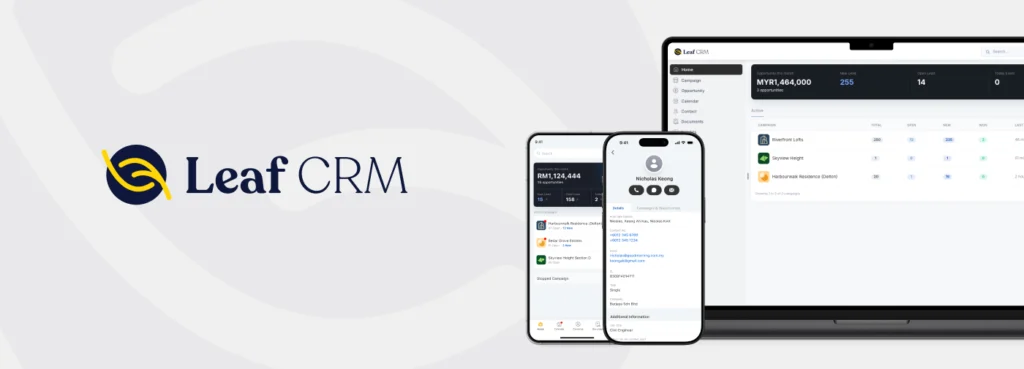
Leaf CRM is well-equipped with a mobile app, free to use. Not just that; our app always has push notifications on. Reps get a push alert on their phone the moment a lead is assigned.
So, it’s up to you to decide whether your reps get emails as something extra to remind them.
3. Set lead frequency
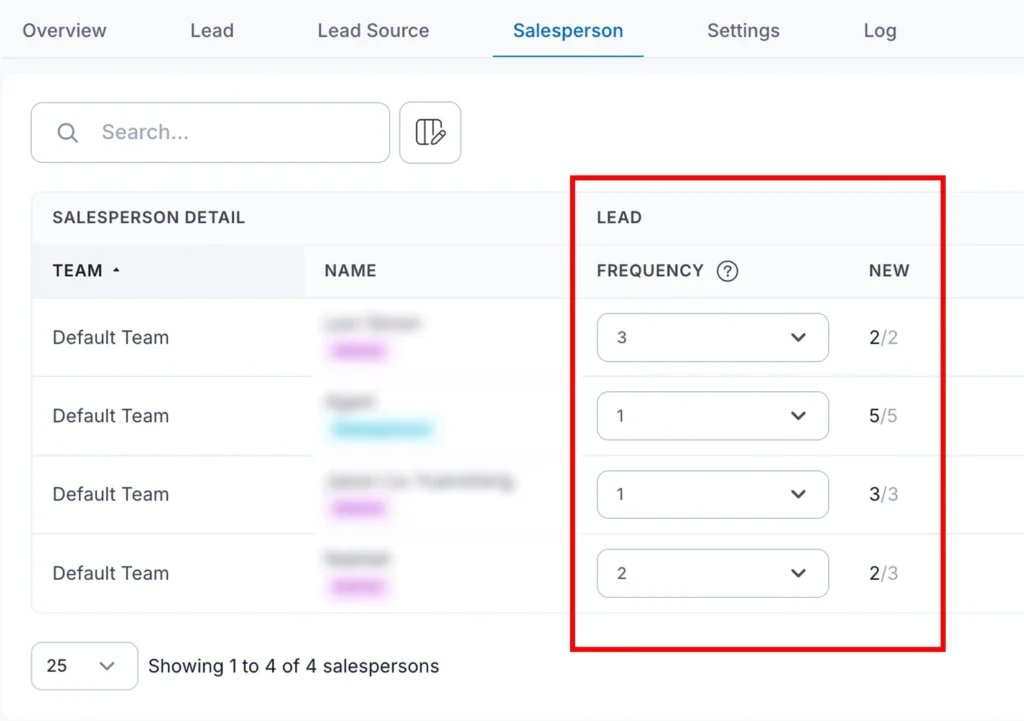
A screenshot of the lead frequency settings in Leaf CRM.
Some CRM software makes it overcomplicated for you to edit this. This limits the actual software’s capabilities because you’re probably a bit too overwhelmed to explore it in the first place.
Setting your lead frequency lets you choose which rep receives more leads. The higher it is, the more they would get.
Leaf lets you change this on a whim through your campaign. You can change it by clicking the ‘salesperson’ tab and immediately set your reps’ lead frequency!
Conclusions
All in all, the title of this article speaks for itself. Round-robin shares leads evenly, and it does so pretty quickly. This is enough for many teams.
If you’re just starting, then it’s best that you try the plain round-robin first. Add a fallback and an availability check. If you need something more details, you can try weighted or capacity rules.
Though, keep in mind that it is pretty overkill to use this system if your team is just you and another guy.
If you’d like to learn more, check out our blog about lead routing. Now, if you’re ready to really get into it, Leaf CRM has a fully functional lead distribution system waiting for you.
Our free plan shares leads using round-robin across up to three reps, so start free — no credit card.
Frequently asked questions (FAQ)
What are lead assignment rules?
Does Leaf CRM have Weighted Round-Robin or the plain one?
Weighted Round-Robin. Leaf CRM utilizes WRR assignment within its system. The software will automatically list the reps you’ve registered and assign suitable leads among them. You can then customize the lead frequency you want to assign to your reps as well.
What does round robin assignment mean?
Round robin assignment is a system in lead management software. It evenly and quickly distributes each captured lead using a rotational pattern between your team. The system is also known as the round robin distribution. So it distributes the workload for every rep fairly.
Is round-robin the best way to assign leads?
It’s the simplest method for a team where everyone is selling the same thing. If yours needs something more specific, then rules must be set for the system. A CRM system with round-robin integrated usually adds an availability check for your reps, alongside fallback rules. If your team needs more, then it needs proper lead routing.
Do you need Salesforce for round-robin?
No. Any CRM with lead assignment or lead distribution built in can do it. A small team can even do it manually until it grows. Using round-robin makes your team’s lead assignment scalable and easier to manage. You can use Leaf CRM to try as it provides a Weighted Round-Robin system.
What is round robin logic?
Round-robin logic means taking turns in a fixed order. Each new lead goes to the next rep on the list, and after the last rep, it starts again at the top.

Nabilah Haidir is a Content Writer Intern at Red Ant Technology. She had written a book entitled 'A Cup of Poe-e-tea', alongside designing a website as additional substance for it. She had also published an extended abstract about it under UiTM'S Journal of the Language and Society Faculty.